

iTerm invisible cursor
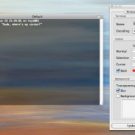
I’m a big fan of the popular Mac OS X terminal application iTerm, but for the first year or so of using it I was irked by a serious problem: my cursor was invisible! [Figure 1] I scoured high and low on the web and found other people reporting this problem but no one offering a solution. I finally found the answer by accident a few months back and thought it was important to get it on the web somewhere so people can find it! If you want to see your cursor in iTerm, for reasons completely unknown to me, you need to set its colours in reverse (that is, set the text colour to the background and the background colour to the foreground)! [Figure 2] That’s all I wanted to say. I’ve never had any problems since. Happy iTerming! Update: My good friend...
 Leeds-based non-binary nerd and sewist. I won't break my streak on Duolingo for anyone.
  Delicious
 Flickr
 Goodreads
 Last.fm
 Leeds Beer Quest
 LinkedIn
 Twitter
 Untappd